Why businesses choose Trello

Trello is more than a task board — it’s a flexible work management platform that supports structured collaboration across teams and departments.


check-circle Clear visual workflows that are easy to understand and adopt

check-circle Fast setup with minimal onboarding effort

check-circle Flexible for different teams and use cases + powerful automation

check-circle Strong integration with the Atlassian ecosystem and third-party tools


Where Trello brings the most value

Trello supports a wide range of business use cases where visibility, simplicity, and collaboration are essential.


Trello Premium — Built for growing teams

Trello Premium is designed for organizations that need more visibility, automation, and administrative control across teams.

  • Advanced Views
  • Unlimited Automation
  • Advanced Collaboration
  • Admin and Security

Advanced Views

Advanced Views

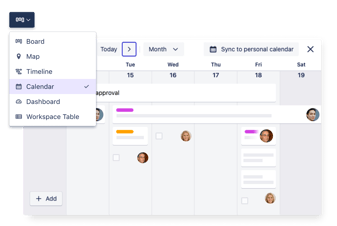
Advanced views for better planning

Go beyond boards and visualize work from different angles:

  • Timeline view for project planning and dependencies
  • Calendar view for deadline-driven work
  • Table view for structured, spreadsheet-like overviews
  • Dashboard view for high-level progress and insights
  • Map view for location-based work

These views help managers and teams understand progress, risks, and priorities at a glance.

UIillo_ViewsSelector_Calendar_2x

Unlimited Automation

Unlimited Automation

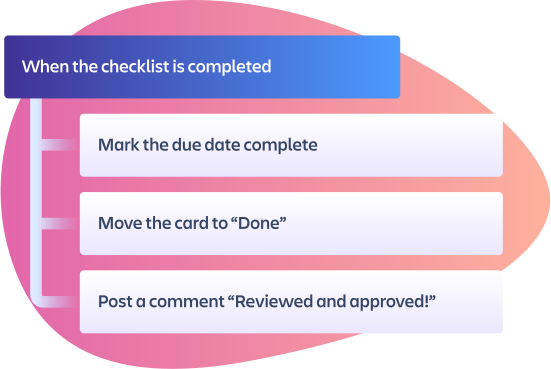
Unlimited automation with Butler

Automate repetitive actions using no-code rules:

  • Move cards automatically
  • Assign owners and due dates
  • Send notifications
  • Enforce process consistency

Unlimited automation makes Trello Premium especially valuable for teams running recurring processes.

Spot-Illo_Rules

Advanced Collaboration

Advanced Collaboration

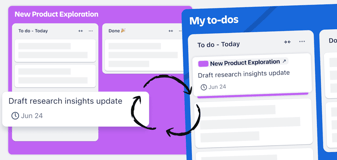
Advanced collaboration and cross-board coordination

  • Card mirroring to view and edit the same card across multiple boards, keeping work aligned across teams and initiatives.
  • Workspace views & saved views — Create and filter board views like Table or Calendar across multiple boards and save them for quick reference.
  • Board collections for grouping related boards and organizing work streams within a workspace.

These features support cross-team collaboration and portfolio-level visibility.

Stay more in sync Trello

Admin and Security

Admin and Security

Admin, security, and control

Trello Premium adds workspace-level administration:

  • Permission and visibility controls
  • Workspace-wide settings
  • Data export for reporting and compliance
  • Priority support
This makes Premium suitable for business-critical workflows.
CWX illustration-Cloud Security

Trello Enterprise: Governance at scale

Trello Enterprise is designed for large organizations that require centralized control, security, and consistency across many teams and workspaces.

Choose this option to scale Trello safely across departments while maintaining governance and visibility.

check-circleAll Trello Premium features across unlimited workspaces

check-circleCentralized Enterprise Admin Dashboard

check-circleOrganization-wide permission policies

check-circleControl over board creation, sharing, and Power-Ups

check-circleSupport for SSO, user provisioning, security policies via Guard

check-circleEnterprise-grade compliance and data protection

Trello integrations and ecosystem

Trello connects work across your existing tool landscape, making it easier to collaborate, share context, and keep information in sync — without changing how teams prefer to work. Key integrations include:


Jira logo icon-2 stagil-newConfluence logo icon-2

Jira and Confluence

Connect high-level planning in Trello with detailed delivery and documentation in Jira and Confluence.

slack-1 stagil-newMicrosoft_Office_Teams_(2018–present) 1

Slack and Microsoft Teams

Get updates, create cards, and collaborate directly from your team communication tools.

Google__G__logo (1) 1 stagil-new0c884ca3-b1c4-49ab-a0b9-86d1e09b1382-product_files__image___video_-Microsoft365_for_Jira-1

Google Workspace and Microsoft 365

Attach files, link documents, and keep work connected to everyday productivity tools.

icons8-registry-editor

Power-Ups and extensions

Enhance Trello with hundreds of Power-Ups for reporting, time tracking, automation, and more.

CWX illustration-Atlassian Intelligence-1
Integration with Atlassian Intelligence Atlassian-Intelligence_mark_brand 4x-1 available

Work smarter with built-in AI

Atlassian Intelligence adds AI-powered assistance to Trello, helping teams work more efficiently and reduce manual effort within Atlassian Cloud products.

How catworkx supports your Trello setup

catworkx integrates Trello into proven solutions that help organizations structure work, improve transparency, and support collaboration across teams. We embed it where it adds the most value — aligned with your processes, teams, and existing Atlassian environment.

There are some of our solutions that can be powered by Trello:


Atlassian Platinum Solution Partner Enterprise – catworkx
Atlassian High Velocity Service Management Award Winner 2024–2025 – catworkx Platinum Solution Partner ITIL Foundation Certified Partner – catworkx Scaled Agile Silver Partner – catworkx Red Hat Certified Partner – catworkx Scrum.org Certified Partner – catworkx Appfire Red Hot Partner – catworkx Atlassian Best in Customer Retention Award – catworkx
Atlassian Cloud Migration Specialization – catworkx Platinum Solution Partner Atlassian Service Management Specialization – catworkx Platinum Solution Partner Atlassian Enterprise Strategy and Planning Specialization – catworkx Platinum Solution Partner Atlassian badge Software EMEA Atlassian badge Cloud AMER Atlassian badge ITSM AMER

FAQs about Atlassian Trello


What is the difference between Trello Free, Standard, Premium, and Enterprise?

Trello Free and Standard are suitable for individuals and small teams.
Trello Premium adds advanced views, unlimited automation, and administrative controls for growing teams.
Trello Enterprise builds on Premium with centralized governance, security, and compliance for large organizations.


Is Trello suitable for business and enterprise use?

Yes. Trello is widely used by businesses of all sizes. Premium supports structured team collaboration, while Enterprise enables organization-wide governance, security, and scalability.


How does Trello pricing work?

Trello uses a per-user subscription model with different plans depending on required features. Premium and Enterprise are billed annually and offer increasing levels of control and functionality.

catworkx can help you select the most cost-effective plan for your organization.

Can Trello be integrated with Jira and Confluence?

Yes. Trello integrates natively with Jira and Confluence, making it ideal for organizations using multiple Atlassian tools.

Can catworkx help us implement Trello?

Absolutely. catworkx supports Trello implementations from planning and configuration to automation, integrations, and user training.


The number of cool products and options can be overwhelming, but I know the shortest path to achieving your goals with minimal costs!
Janine Sauer
Atlassian Expert, Products, Integrations

See how Trello works for your teams

Get a personalized walkthrough of Trello tailored to your processes, use cases, and industry!

Latest updates and news about Trello:

Atlassian System of Work: What’s Impossible Alone Is Possible Together

Atlassian understands that effective teamwork relies on common objectives, synchronized efforts, and seamless information exchange among teams. Looking to the future, Atlassian is driven by a new mission to assist organizations in maximizing each team’s ...
Read More

Optimizing Task Management with Trello's Latest Enhancements

Trello, the renowned task management tool trusted by teams worldwide, is introducing new features aimed at enhancing administrative efficiency and bolstering security measures. With a focus on centralized administration and robust security controls, ...
Read More